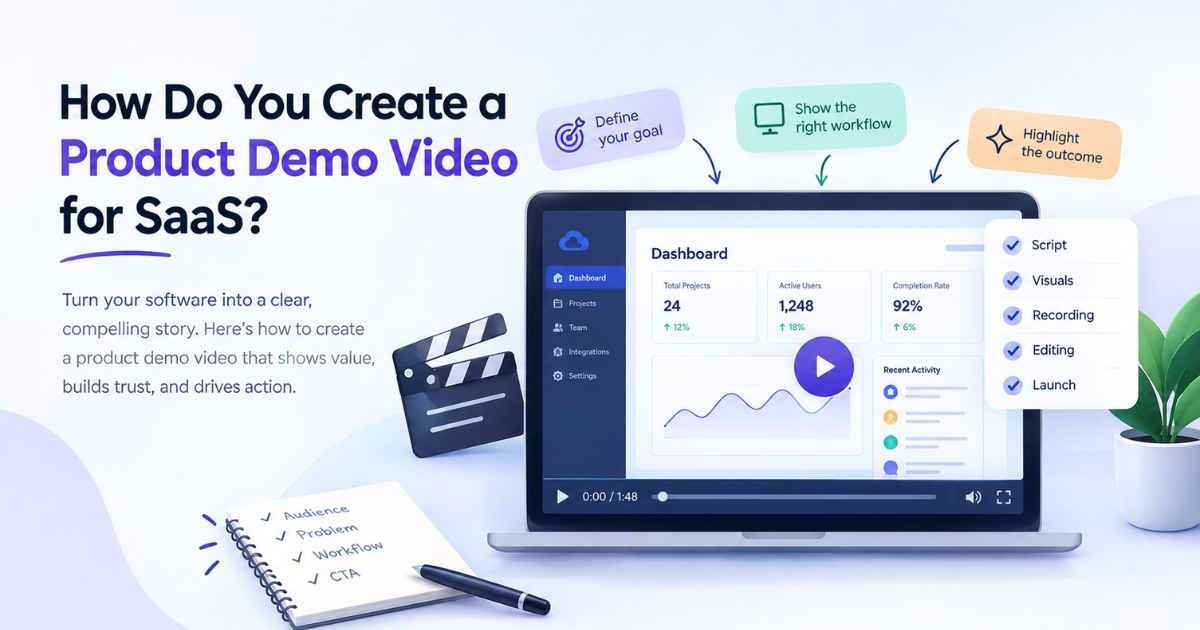
A SaaS product can solve a serious business problem and still struggle to convert visitors if people cannot quickly understand how it works. This is particularly true for products with complex dashboards, multiple workflows, integrations, automation, analytics, or technical processes that are difficult to explain through screenshots and website copy alone.
That is where a product demo video becomes valuable. Instead of asking potential customers to read through feature pages or imagine how the software works, a demo allows them to see the product in action and understand how its functionality connects to a real business outcome.
But creating an effective SaaS product demo is not simply a matter of recording the screen and adding a voiceover. A video can show dozens of features and still leave the viewer wondering, “So what does this actually do for me?”
The strongest product demos are built around a much simpler idea: show the right product experience to the right audience in a way that makes the value immediately understandable.
Here is how to approach it.
1. Start With the Customer’s Problem
The easiest mistake to make when creating a product demo is starting with the product.
The video opens with the company logo, moves directly into the dashboard, and begins explaining features. While this may make sense internally, the viewer has not yet been given a reason to care about what they are seeing.
Instead, begin with the problem your audience already recognizes.
Imagine a SaaS platform that helps sales teams automate lead follow-ups. Rather than opening with the CRM dashboard, the video could establish the frustration first: sales representatives are manually tracking prospects, follow-ups are being missed, and managers have limited visibility into the pipeline.
Once the problem is clear, the product becomes the solution to that problem rather than simply another piece of software being introduced.
A useful rule: Don’t ask, “What should we show first?” Ask, “What problem should the viewer recognize first?”
2. Identify the One Workflow That Creates the “Aha” Moment
SaaS platforms often contain far more functionality than a single video can reasonably demonstrate.
There may be dashboards, integrations, analytics, permissions, automation, collaboration features, reporting tools, templates, notifications, and dozens of smaller capabilities. Trying to showcase everything usually turns the demo into a product tour rather than a persuasive marketing asset.
Instead, identify the aha workflow, the sequence of actions that best demonstrates why the product is useful.
For example:
Problem → Action → Automation → Result
A marketing automation platform could demonstrate how a marketer:
- Connects a campaign.
- Imports relevant customer data.
- Creates an automated workflow.
- Let the platform process the information.
- Receives a completed report or triggered campaign.
That sequence tells a complete story without requiring the viewer to understand the entire platform.
The objective is not to demonstrate everything the software can do. It is to demonstrate enough of what it can do for the viewer to understand why they would want it.
3. Build the Script Around the User Journey
Once the workflow is clear, turn it into a narrative.
A strong SaaS demo should naturally answer five questions:
| Viewer Question | What the Video Should Explain |
| What is the problem? | Establish the customer’s current challenge |
| Why does it matter? | Show the cost, friction, or inefficiency |
| How does the product help? | Introduce the relevant solution |
| How does it work? | Demonstrate the key workflow |
| What happens next? | Show the outcome and CTA |
This approach keeps the script focused on the viewer rather than the product roadmap.
The narration should also add meaning to what is happening on screen. If the viewer can already see a button being clicked, the voiceover does not need to repeat, “Click the blue button.”
Instead, it can explain why the action matters:
“Once the campaign is connected, the platform automatically pulls performance data into a single report.”
The screen demonstrates the mechanics. The narration explains the meaning.
That distinction makes a significant difference when explaining complex software.
4. Show the Product Early
A SaaS demo should not spend most of its opening explaining the company before the viewer gets to see the software.
According to What a Story’s analysis of more than 1,000 SaaS explainer and product videos, 72% of the videos analysed show the real product interface, with the strongest examples introducing the UI within the first 15 seconds.
That does not mean every SaaS video should immediately throw a dashboard onto the screen.
It means that once the problem and context have been established, the viewer should get tangible evidence of the product fairly quickly.
This is especially important for prospects who are already evaluating solutions. They do not simply want to hear that the platform is “powerful,” “intuitive,” or “AI-powered.” They want to see what that actually means.
5. Make the Interface Easy to Follow
A software interface can contain a huge amount of information, which means simply recording the entire screen is rarely enough.
The viewer needs visual guidance.
Depending on the product and workflow, this could include:
- Zooms that direct attention toward an important interface element.
- Cursor movement that makes the user’s journey easier to follow.
- Callouts that explain unfamiliar functions.
- UI animation that highlights changes within the product.
- Motion graphics that explain processes happening behind the interface.
- Transitions that separate different stages of the workflow.
The objective is not to make the video visually complicated. It is to reduce the amount of effort required from the viewer.
A good product demo video essentially tells the audience, “Look here. This is the important part.”
6. Connect Every Feature to an Outcome
Feature lists are easy to create and easy to forget.
Instead of saying:
“Our platform offers automated reporting.”
Show the situation before automation, demonstrate the workflow, and then show the completed report.
The difference is subtle but powerful.
The first version communicates a feature.
The second communicates a change in the customer’s experience.
This outcome-focused approach can be applied to almost any SaaS product:
- Automation → less repetitive manual work
- Analytics → faster access to useful information
- Collaboration → fewer communication gaps
- Integrations → less switching between platforms
- AI → faster completion of a complex task
- Reporting → clearer visibility for decision-makers
A product demo becomes significantly more persuasive when viewers can see the consequence of using the feature rather than simply hearing that the feature exists.
7. Prepare the Product Before Recording
Production quality is often determined before the first frame is recorded.
A messy demonstration environment can make an otherwise excellent product look unfinished. Before recording, create a clean demo account with realistic but non-sensitive data. Remove unnecessary browser tabs, disable notifications, prepare sample projects, and make sure the workflow can be completed without irrelevant detours.
Then rehearse the complete sequence.
Rehearsal helps identify problems such as:
- Slow-loading screens
- Confusing navigation
- Unnecessary clicks
- Unexpected pop-ups
- Difficult transitions
- Features that require too much explanation
It is much easier to fix these issues before recording than to repair them through editing.
The cleaner the workflow, the easier it becomes to create a clean story.
8. Choose the Right Production Style
Not every SaaS product should be demonstrated in the same way.
A straightforward software workflow may work extremely well with screen capture and UI animation. A technical AI platform, cybersecurity product, or data infrastructure tool may require animation to explain processes that are invisible inside the interface.
This is where a hybrid approach can become particularly effective.
For example:
Real-world problem → Animated explanation → Product interface → Result → CTA
Animation can simplify the abstract concept, while the real interface provides credibility and demonstrates that the product actually works.
What a Story’s analysis found was that motion graphics represented 48% of the SaaS videos studied, while screen-capture demos accounted for 27%. The takeaway is not that one format universally wins; rather, different formats solve different communication problems.
The production style should therefore follow the communication objective, not the other way around.
9. Keep the Video Focused, Not Necessarily Short
There is no single “perfect” duration for every SaaS product demo.
A homepage video may need to communicate the core value proposition in around a minute. A feature-specific demonstration may need more time because the viewer is already interested in that functionality. A sales enablement video can be longer if the additional detail helps prospects evaluate the product.
The important thing is that every second should have a purpose.
What a Story’s 2026 analysis found is that the average explainer delivered by the company has fallen from 115 seconds in 2015 to 45 seconds in 2026. However, this does not mean every SaaS video should be 45 seconds; the appropriate length still depends on the objective, audience, and CTA.
For complex products, creating multiple focused demos can often be more effective than producing one enormous video.
For example:
- Homepage demo
- Feature demo
- Integration demo
- Use-case demo
- Sales demo
- Onboarding walkthrough
Think of the collection as a library of answers, rather than one giant explanation.
10. Use Customer Language
SaaS companies often describe their products using internal terminology.
A company might call its platform an:
“AI-powered workflow orchestration solution.”
The customer might describe the same benefit as:
“It stops our team from manually moving information between different tools.”
The second version is often much easier to understand.
Customer interviews, sales calls, support tickets, reviews, onboarding conversations, and FAQs can reveal the language people actually use when describing their problems.
That language should influence the product demo script.
When viewers recognize their own words and frustrations in the video, the product feels more relevant before the feature demonstration even begins.
The Product Demo Is a Sales Conversation in Video Form
A great SaaS product demo does not attempt to replace the entire sales process. Instead, it handles the repetitive explanation that prospects need before they are ready to have a deeper conversation.
The best demos make complex products feel understandable without stripping away the functionality that makes them valuable.
If you are creating a SaaS product demo, remember the basic framework:
Problem → Context → Product → Workflow → Outcome → CTA
Start with the customer’s problem. Show the product before attention disappears. Focus on the workflow that creates the biggest “aha” moment. Use the interface as visual evidence, not to fill the screen with unnecessary activity. Connect features to outcomes, and end with a clear next step.
If you want to understand what the data says about SaaS video production, length, hooks, UI usage, pacing, and CTAs, an analysis of 1,000+ SaaS videos provides a useful benchmark based on a large collection of SaaS videos.
Ultimately, the purpose of a product demo is not to prove that your software has a lot of features.
It is to make the viewer think:
“I understand how this works — and I can see how it would solve my problem.”
That is when a product demo stops being a screen recording and starts becoming a powerful SaaS marketing asset.
Disclaimer: The information provided in this article is for general informational and educational purposes only. It does not constitute professional video production, marketing, or business advice. Product demo strategies, video length benchmarks, and production approaches vary by audience, product complexity, and marketing goals. Readers should test different formats and messages against their own conversion data. The mention of specific statistics, tools, or analyses is illustrative and does not imply endorsement. The author and publisher disclaim all liability for any marketing outcomes, production costs, or business decisions arising from reliance on this content. This article does not guarantee specific conversion or engagement results.
Ready to build something extraordinary? Our extraordinary-building resources help you create greatness.