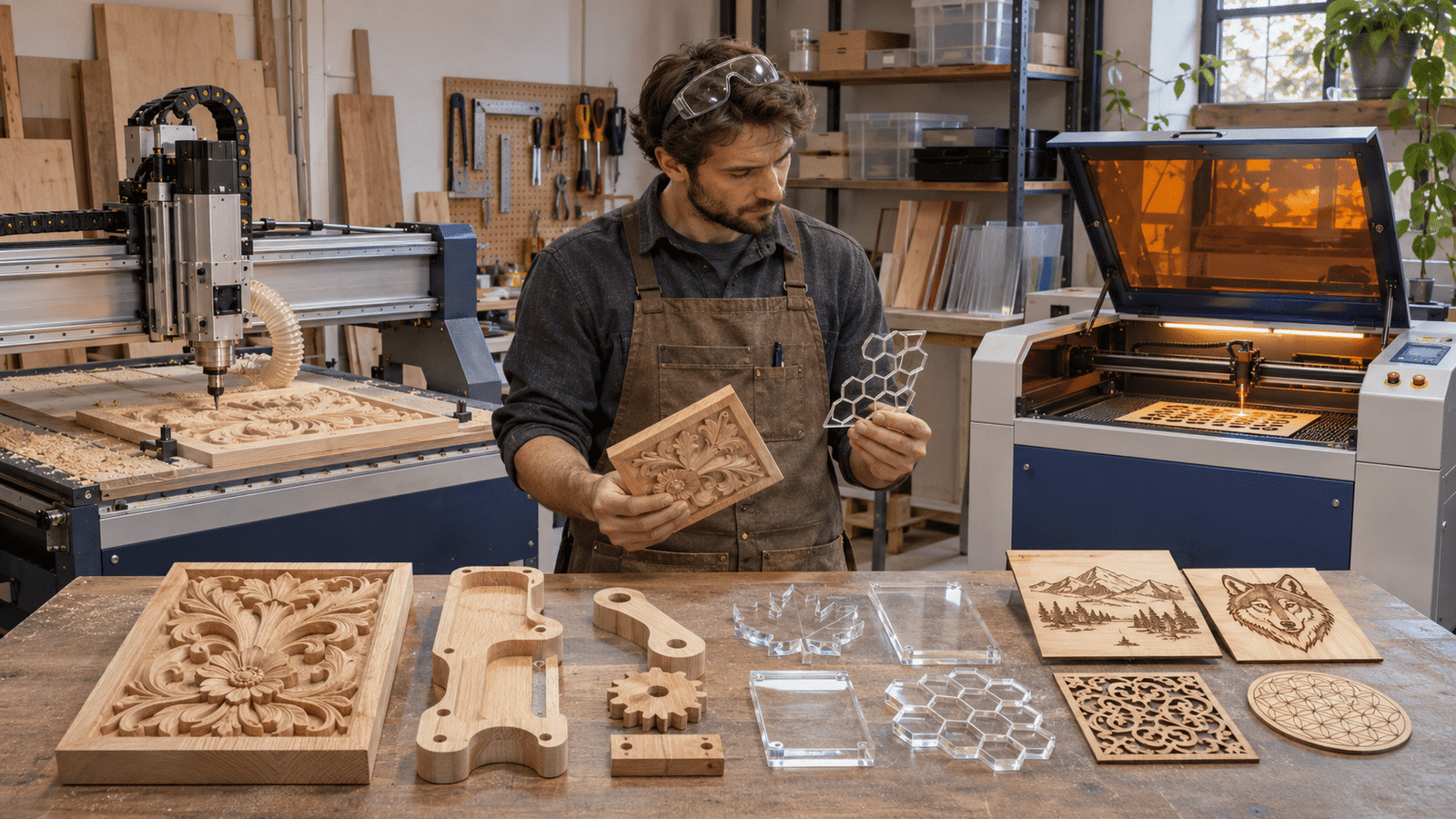
Choose a CNC router for cutting, grooving and carving thicker wood and panel material. Choose a CO2 laser for fine contours and engraving on compatible non-metals such as plywood and acrylic. A workshop making both furniture parts and detailed signs may eventually need both.
A wooden sign, a furniture panel and an acrylic display can start from the same digital file, yet each rewards a different machine. Price and table size alone do not settle it. This guide explains how each technology works, which projects suit it, what space, safety and running costs to expect, and which questions to answer before buying.
How CNC Routers and CO2 Lasers Work
A CNC router removes material mechanically. A spindle spins a cutter along a programmed toolpath (the route the cutter travels) while the workpiece stays clamped to the table or held by vacuum. The cutter can follow a line, clear a pocket or carve at varying depths, so depth and three-dimensional shape are the router’s natural strengths.
A CO2 laser removes material with heat. A focused beam burns, melts or vaporises the surface of compatible non-metals along the design path. Nothing touches the workpiece, which suits delicate shapes and shallow engraving, but beam power limits how deep a cut can go.
Both machines read digital files, but the physics differ: a router presses a tool into the material, a laser applies heat. That difference explains most trade-offs below.
Materials and Projects: Which Machine Does What?
Three common workshop jobs show where each technology fits.
Custom wooden furniture components. Grooves, rebates, pockets and carved relief in solid wood or thick panels are routing work. A router removes material to a set depth and can cut through thicker boards. A laser can cut thin wood, but it cannot replace a router for pockets or relief.
Engraved plywood signs and detailed acrylic shapes. Lettering, ornamental cut-outs and small decorative parts favour a CO2 laser, provided the material is laser-compatible and within the machine’s thickness limit. Acrylic sheet is commonly laser-processed, though results vary by sheet type.
Personalised retail displays and prototypes. The answer depends on thickness, material, shape and finish. A flat display in thin acrylic with engraved branding suits a laser. A thick wooden stand with shaped edges suits a router. Some workshops combine both machines.
Material compatibility needs care. Not every sheet sold as acrylic, composite or plastic is safe for a laser. PVC and PVC-based vinyl must never be processed, since heating can release toxic, corrosive hydrogen chloride and other chlorine-containing gases. Unknown coatings and unverified composites should stay away from the laser as well.
Edges differ too. Laser-cut wood often shows darkened or charred edges. Routed parts need suitable cutters, secure clamping, chip removal and, in some cases, edge finishing.
When a CNC Router Is the Better Choice
A CNC router earns its place when parts have depth. Furniture panels, joinery details, carved decorative boards and thicker wooden components are typical work. Four parameters decide whether a given machine fits:
- Working area. It should hold your largest regular workpiece with room for clamping.
- Spindle and tooling. Spindle power and the available cutters set realistic materials and cut depths.
- Workholding. Clamps or a vacuum table must keep the sheet from shifting during deep passes.
- Dust collection. Routing produces fine dust and chips that need extraction.
A compact bench machine and a full-sheet production router belong to different classes, so match the class to your weekly workload. Some routers can machine aluminium and other soft metals, but that depends on the specific machine, its cooling and its tooling. Confirm it for the exact model rather than assuming it.
For workshops producing furniture components, carved panels or thicker wooden parts, the working area, spindle configuration and material compatibility are important selection criteria. Comparing available CNC router machines (https://virmer.com/catalog/cnc-milling-machines/) can help illustrate how different machine formats, from compact bench units to full-sheet tables, correspond to these tasks.
When a CO2 Laser Makes More Sense
A CO2 laser makes more sense when the work is flat, detailed and made of compatible non-metals. Typical jobs include engraved text and graphics, decorative cut-outs, nameplates, awards and acrylic parts.
The beam never touches the material, so thin parts need no clamping force, and intricate contours or small lettering do not depend on cutter diameter. That makes a laser a natural fit for small batches of personalised items.
The limits are real. Cutting capacity depends on laser power and material, and thick wood is slow or impractical to cut. Wood edges may darken, so sanding or masking is sometimes needed. A CO2 laser also needs supporting equipment: an extraction system for smoke and, on many systems, water cooling or a chiller as the manufacturer specifies.
Space, Safety and Running Costs
A router needs room for axis travel and for loading full sheets. It is loud, and it needs a dust and chip collector. Cutters wear and need replacing, and the spindle follows the manufacturer’s maintenance schedule.
A laser typically runs inside a closed enclosure, but enclosure and extraction are separate requirements. The enclosure shields the operator from the beam; ventilation removes smoke and fumes. A CO2 laser always needs ventilation with a safe discharge route. Wood, paper and acrylic can ignite, so a running laser must never be left unattended. Lenses and mirrors need regular cleaning, and cooling follows manufacturer requirements.
Both machines add costs beyond the purchase price: consumables (cutters, or laser tube and optics), power, operator training, job preparation and maintenance. Neither belongs in an ordinary living space without proper dust or fume control. Follow the manufacturer’s manual and local safety regulations.
What to Consider Before Investing in Either Machine
Five questions narrow the choice:
- Do we mostly make deep, shaped parts or flat parts with fine contours?
- What are our typical sizes, thicknesses and materials?
- How many items do we produce per week, and how repeatable must batches be?
- What limits on space, noise, extraction and maintenance apply?
- Does the supplier offer advice, material testing and technical support?
The last question matters because machine sizes, power and options vary widely. Suppliers such as Virmer, a supplier of CNC routers and laser cutting and engraving equipment, as well as other production machinery, let a business compare both technologies with one source. Whichever supplier you choose, ask for a test on your own material before you commit.
Conclusion
Neither machine wins outright. A CNC router suits milling, pockets, relief and heavier mechanical work. A CO2 laser suits fine contours, engraving and cutting compatible non-metals. Before buying, check your materials, part geometry, machine dimensions and safe operating conditions, and test sample parts where possible. Match the machine to the work you do most often, and confirm the match on your own material.