A buyer’s guide to video ecosystems, latency, displays, receivers, comfort, recording, and antennas
Start With the Video Ecosystem
Goggles must be compatible with the video transmitter on the aircraft. Analog 5.8 GHz systems are valued for broad compatibility, predictable breakup, low cost, and low latency. Digital systems can deliver a clearer image and may offer onboard recording or richer telemetry, but the goggles, air unit, cameras, and firmware generally need to belong to the same ecosystem.
Decide whether you are building around analog, DJI, Walksnail, HDZero, or another platform before comparing screens. Adapters and external receivers can extend some goggles, yet they add cost, wiring, and bulk. Native compatibility is usually the simplest path for a new pilot.
Match the Format to Your Flying
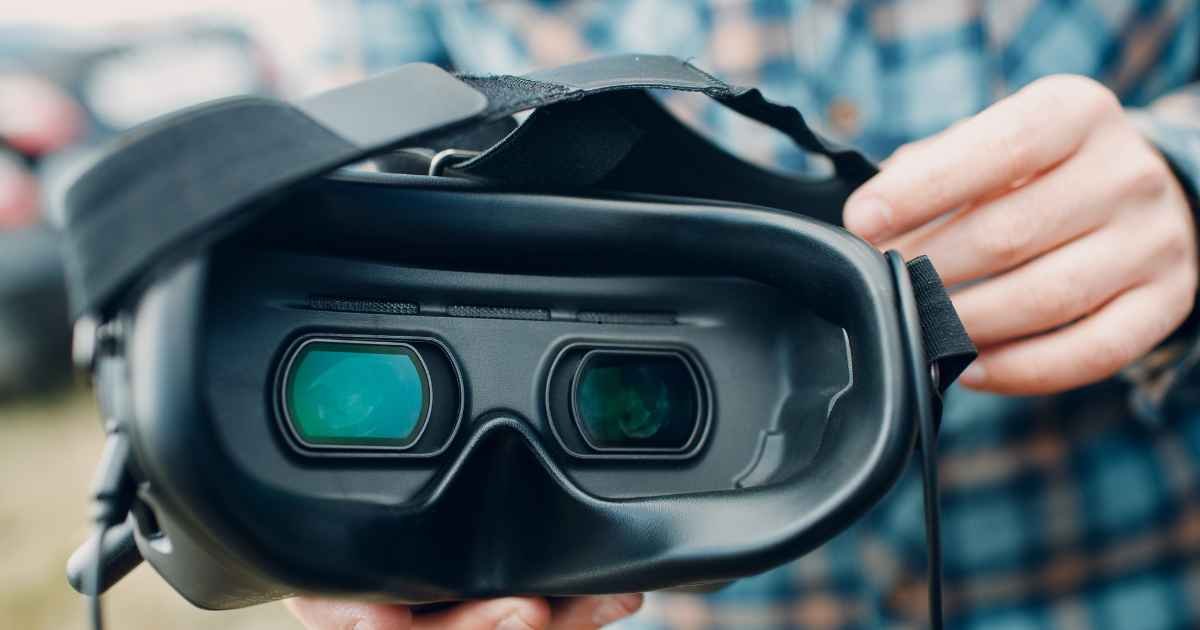
Box goggles use one larger display viewed through a lens and often provide strong value for beginners. Binocular goggles use separate displays and can be smaller, lighter, and more adjustable, but usually cost more. Screen resolution and optics affect clarity, while field of view determines how large the image appears. Bigger is immersive, though an extremely wide view can make edge information harder to scan.
When reviewing fpv goggles, separate essential requirements from luxury features. A racer may prioritize low latency and reliable signal behavior. A cinematic pilot may value high resolution and color. A beginner may benefit most from easy controls, glasses compatibility, integrated recording, and a screen that is comfortable for repeated practice sessions.
Understand Latency and Signal Behavior
Latency is the delay between the camera capturing an image and the pilot seeing it. Small differences matter more during fast racing or close-proximity freestyle than during relaxed cruising. Published latency figures should be read in the context of the complete system, including camera mode, air unit, receiver, processing, and display refresh.
Signal breakup also matters. Analog video commonly becomes noisy as reception weakens, giving the pilot a gradual warning. Digital systems may retain a clean image longer, then show blockiness, frame drops, or a sharper loss of usability. Learn the behavior of your chosen system at safe distances rather than discovering its limits over difficult terrain.
Evaluate Displays and Optics
Resolution is important, but contrast, brightness, refresh rate, lens quality, and focus adjustment also shape the image. OLED panels can provide deep blacks and strong contrast. LCD-based designs can still deliver excellent results when paired with good optics. Pilots who wear corrective lenses should confirm whether glasses fit or whether diopter inserts and focus adjustment cover their prescription.
Interpupillary-distance adjustment helps align binocular displays with the pilot’s eyes. Uneven focus, edge blur, or pressure on the nose can become tiring during long sessions. Comfort is personal, so dimensions, face-foam options, weight distribution, and strap design deserve the same attention as specifications.
Receiver and Antenna Choices Matter
For analog goggles, receiver sensitivity, diversity operation, and module options influence reception. Diversity systems can choose or combine signals from two antennas, often pairing an omnidirectional antenna for nearby coverage with a directional antenna for range in front of the pilot. Connector type and polarization must match the planned antennas.
Digital goggles may use integrated antennas designed for their ecosystem. Follow manufacturer guidance before replacing them, and never power a transmitter without an antenna when the design requires one. Position the pilot to maintain a clear radio path and avoid placing vehicles, reinforced walls, or the body directly between antennas and the aircraft.
Recording, Power, and Field Use
A built-in DVR is useful for reviewing lines, locating a lost quad, or sharing a flight. Goggle DVR quality may be lower than onboard HD recording, but it captures what the pilot actually saw, including signal problems. Confirm supported card format, capacity, recording resolution, and whether recording affects runtime or latency.
Check the battery type, connector, charging method, and realistic field runtime. An internal battery is convenient, while an external pack can be swapped. Retailers such as MEPSKING may offer goggles across several systems and price levels, but compatibility with the aircraft’s video transmitter must remain the deciding factor.
Common Goggle-Buying Mistakes
The most expensive error is choosing a headset before choosing the video ecosystem. A high-resolution goggle cannot display an incompatible air unit without a supported input or adapter. Pilots also compare panel resolution while overlooking focus range, face fit, and antenna connectors. These practical details determine whether the device is comfortable and usable at the field.
Another mistake is treating advertised range as a property of goggles alone. Transmitter power, antennas, polarization, installation, terrain, interference, and regulations all shape the link. Build and test the complete system progressively. Never use a long-distance flight to discover that an antenna is loose, a channel is crowded, or the receiver configuration is wrong.
Test Before Committing to Difficult Flights
Set the correct band, channel, region, and output settings. Verify that the antenna is attached, the image format is correct, and recording works before takeoff. For analog systems, avoid sitting on a channel used by another pilot. At group sessions, coordinate frequencies and power levels to protect everyone’s video link.
Good goggles disappear during flight: the image is readable, the fit is stable, and controls are easy to reach. Choose the ecosystem first, then judge latency, signal behavior, optics, comfort, receiver performance, and power. This order prevents a beautiful display from becoming an expensive device that cannot communicate with the aircraft you intend to fly.
Disclaimer: The information provided in this article is for general informational and educational purposes only. It does not constitute professional technical, purchasing, or safety advice. FPV systems, compatibility, and regulations vary; always verify your equipment setup and follow local laws. The mention of specific brands or retailers does not imply endorsement. The author and publisher disclaim all liability for any equipment damage, personal injury, or other consequences arising from reliance on this content. This article does not guarantee specific performance outcomes. Always test your setup in safe conditions before demanding flights.
Find the answers you’ve been searching for—our in-depth analyses cut through the noise and give you the truth.