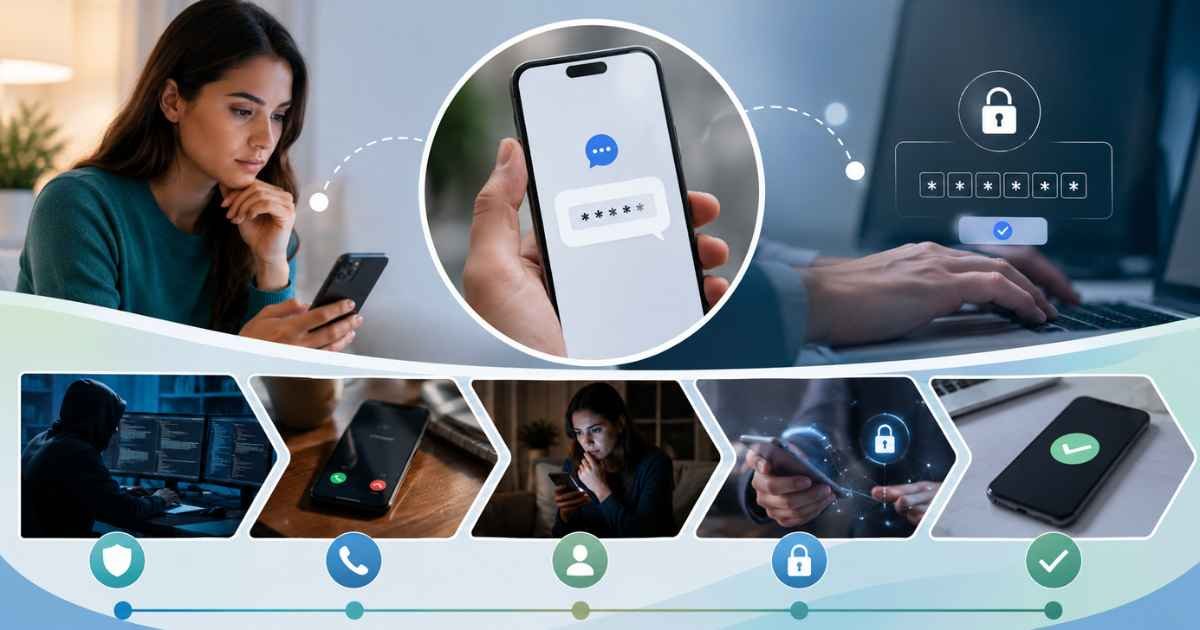
Your phone buzzes and there it is, a short message with a string of digits and maybe a link, asking you to confirm something you don’t remember starting. When you haven’t just tried to log in anywhere, that little message can feel unsettling. Most of the time there’s a boring, harmless explanation behind it. Once in a while, though, it’s worth a second look. This guide explains, in plain terms, why these texts show up on your phone, when you can ignore them, and when you should actually do something.
Here’s the quick answer. A link verification code text is a security message a website or app sends to confirm that the person trying to sign in, reset a password, or set up an account really controls your phone number. If you didn’t start any of those actions yourself, the usual reason is that a stranger typed the wrong number, or a service you’d forgotten about still has your number on file. It only becomes a concern when it lines up with other warning signs, which we’ll get to below.
What a link verification code text actually is
Strip away the jargon and it’s simple. When you, or supposedly you, start something sensitive, such as logging in, changing a password, or confirming a purchase, the service generates a short, temporary code and sends it to the phone number attached to the account. You type that code back into the app or website to prove you’re really there. Some messages include a tappable link instead of, or alongside, the code, and opening it takes you to a confirmation page. Either way, the goal is the same: prove that whoever entered the password also has the phone.
These codes are a form of two-factor authentication, often shortened to 2FA. The idea is that a password on its own isn’t enough. Picture your account as a door with two locks. The password is one lock, and the code is the second. A thief who has only your password still can’t get in without the code that lands on your phone. That’s why the codes exist, and it’s also why they’re valuable to the wrong people, a point we’ll come back to.
The most common reasons you’re getting one
There isn’t a single answer, but the reasons tend to fall into a short list. Running through them usually tells you which situation you’re in, and most of them are nothing to lose sleep over.
Someone typed the wrong number
This is the most common and least worrying explanation. Phone numbers get recycled, and people mistype digits all the time. If a stranger meant to enter their own number to sign up for a food-delivery app and got one digit wrong, their code lands on your phone instead. There’s nothing to fix on your end. You can’t use the code, they’ll eventually realize their mistake, and the message means nothing for your security. If it happens once and then stops, this is almost certainly what happened.
A login started on a new device
Many services send a code the first time you sign in from an unfamiliar phone, browser, or location. If you just logged into your email on a new laptop or reinstalled an app, the code is expected and you can go ahead and use it. If you didn’t do anything, though, it can mean someone entered your username and password somewhere, and the service is now asking for the second lock. That version deserves attention, so check whether the timing matches anything you actually did.
A password reset was requested
When someone clicks the “forgot password” option, most platforms fire off a code to confirm ownership before letting anyone set a new password. If you requested the reset, all is well. If you didn’t, it usually means someone tried to take over your account and got stopped at the code step. Don’t tap any reset links inside a message you didn’t ask for, and if you’re worried, change that password by opening the official app or website directly rather than trusting the text.
You saved your number with a payment service
A lot of people are surprised to learn their number is tied to a checkout tool they barely remember using. Stripe’s “Link” feature is a good example. If you once saved your card and phone number to check out faster on an online store, Stripe may text you a code the next time you pay somewhere that uses it. The message often reads like “Your Stripe verification code is” followed by a number, and it’s completely legitimate, because it’s confirming a payment you’re making. If the timing matches a purchase you’re in the middle of, there’s no cause for concern.
An old account still has your number
We all leave behind a trail of forgotten logins, an old shopping site, a social account from years ago, a service you signed up for once and never touched again. Any of them can still use your number for verification. If someone tries to get into one of those dormant accounts, you might receive a code out of nowhere, sometimes years later. Treat it as a nudge to close accounts you no longer use and to remove your number wherever you can.
Someone is testing a stolen password
Data breaches leak enormous numbers of username-and-password pairs, and attackers feed those lists into automated tools that try them on other sites, betting that people reuse passwords. This is called credential stuffing. If one of your reused passwords sits in a leaked list, a service might send a code because the attacker’s automated login got past the password stage. Receiving the code means the second lock held, which is good, but it’s a clear signal to change that password everywhere you’ve used it.
It’s a scam or phishing attempt
Not every code text is genuine. Scammers send fake verification messages built to look official, hoping you’ll tap a link to a lookalike login page or reply with the code. Some go further and call or text you pretending to be your bank, saying they need “the code we just sent” to fix a problem on your account. That is always a trap. It’s worth understanding on its own, and the sections below cover how to spot it.
Are the codes themselves dangerous?
This trips people up, so it’s worth stating clearly. Simply receiving a code does not, by itself, compromise your account or your phone. A code is just a number sitting in your messages. Nothing bad happens the moment it arrives. The risk lives entirely in what you do next. You get into trouble only if you tap a malicious link, enter the code on a fake page, or read it out to someone who then uses it. That’s actually reassuring, because it means you’re in control. Do nothing, and a stray code is harmless.
When you can safely ignore it, and when to pay attention
A single code that arrives once, with no link you feel pressured to tap and no follow-up asking you to share it, is almost always a wrong number or a harmless system quirk. You can delete it and move on. Don’t reply, and don’t tap any link inside it. Even a harmless-looking message doesn’t need a response, and replying only confirms to a sender that your number is active.
Start paying closer attention when the pattern changes. Repeated codes in a short span, especially for an account you know matters, suggest someone is actively trying to get in. A code that arrives at the exact moment a stranger calls or messages asking for it is a bright red flag, because that combination is the signature of an account-takeover scam. And a code paired with a threatening or urgent message, along the lines of “your account will be closed unless you confirm now,” is designed to rush you into a mistake.
What to do the moment a suspicious code arrives
Keep it simple and act in order. First, don’t share the code with anyone, for any reason. The U.S. Federal Trade Commission is blunt about this: a verification code is only for you to enter yourself, and anyone who asks you to read it out is a scammer. No real bank, delivery company, or tech-support line will ever ask you for it.
Second, don’t tap links inside a message you didn’t expect. If you think there might be a genuine issue with an account, open the app or type the website address yourself instead of trusting a link someone sent you. That single habit defeats most phishing attempts before they start.
Third, check your account activity. Services like Google, Apple, and Microsoft let you review recent sign-ins and see unfamiliar devices or locations. If something looks wrong, change your password right away from the official site, then sign out of all active sessions so anyone lurking gets kicked out.
Fourth, if the same number keeps texting codes, block it. If the messages claim to be from a specific company, contact that company using a number from your statement or their official website, never a number provided in the text itself. And if money or a shared code is involved, report it to the FTC at ReportFraud.ftc.gov so the pattern gets tracked.
How to get fewer of these texts in the first place
You can’t stop strangers from mistyping their own numbers, but you can shrink your exposure. Start by cleaning up old accounts. Close logins you no longer use and remove your phone number from services that don’t need it. The fewer places your number lives, the fewer surprise codes you’ll see.
Next, stop reusing passwords. Reuse is what turns one old breach into a flood of login attempts across your accounts. A password manager makes it painless to give every account its own long, random password, which cuts credential-stuffing attempts off at the knees. You’ve probably seen the general news cover breach after breach, and unique passwords are the single most effective response an ordinary person can take.
Finally, upgrade how you do two-factor authentication where it matters most. Text-message codes are better than nothing, but they can be intercepted through a trick called SIM swapping, where a criminal convinces your carrier to move your number to their own phone. An authenticator app, such as Google Authenticator, Microsoft Authenticator, or Authy, generates codes on your device that never travel over the network, so they’re much harder to steal. For your most important accounts, a hardware security key or a passkey is stronger still.
The messages that look almost right
The hardest cases are the ones that feel plausible. A text that names a company you actually use, arrives when you half-expected it, and asks you to “confirm” through a link can fool careful people. The trick is to slow down and separate two questions: did I start this, and am I entering the code where I chose to go? If you started the action and you’re typing the code into the app or site you opened yourself, you’re fine. If either half is missing, meaning you didn’t start it or someone else steered you to the page, stop.
It also helps to remember what these messages are for. A code proves you have the phone. It is never something you hand to another person, and no legitimate process asks you to. Hold onto that one rule and the vast majority of code-related scams fall apart, because every one of them depends on you breaking it.
Two-factor authentication you switched on yourself
There’s one reason that’s easy to overlook: you turned this on. When you enable text-based two-factor authentication on an account, you’re asking to receive a code every single time you sign in. Weeks later, once you’ve forgotten you flipped that switch, a code during your own login can feel random even though you invited it. If a code reliably arrives right after you type a password on a site you use often, this is almost always the explanation. It isn’t a glitch and it isn’t an attack; it’s the system protecting you exactly as designed, and you can enter the code and carry on.
A quick real-world example
Picture two different mornings. On the first, you’re buying concert tickets and the checkout page tells you it’s texting a code to confirm the purchase. A code arrives, you type it in, the order goes through, and that’s the whole story. Completely normal. On the second morning, you’re eating breakfast and haven’t touched your phone for anything important when a code lands for your email account, followed a minute later by a message saying, “This is your bank’s security team, please confirm the code we just sent.” Nothing about that second scene adds up. You didn’t start a login, and a real bank would never send that follow-up. The first is routine, the second is an attack in progress, and the difference isn’t the code itself but the context around it.
How to tell a real message from a fake at a glance
Genuine verification texts are usually plain and a little dull. They show the company’s name, a short code, and often a note telling you to ignore the message if you didn’t request it. They don’t threaten you, they don’t beg you to hurry, and they never ask you to send the code back. Fake messages tend to do the opposite. They pile on urgency, include a link to a web address that’s slightly off from the real one, or turn up alongside a call or text pressuring you to act right now. If a message pushes you to feel something, whether that’s panic, excitement, or fear, slow down and check it through the official app instead of reacting to the text.
Here’s one more useful tell. Look at where a link actually points before trusting it. Scammers register web addresses that resemble real ones, swapping a single letter or tacking on an extra word, so a link that looks close at a glance can lead somewhere entirely different. The safest habit is to ignore links in unexpected texts completely and reach the service the way you normally would, by opening its app or typing its address yourself.
What these codes can and can’t protect
It helps to be realistic about what a text code actually does. On the plus side, it blocks the most common kind of attack, the one where someone has only your password. Even if that password leaks in a breach, an attacker still can’t finish a login without the code on your phone, and that stops a large share of takeover attempts cold. On the minus side, a text code can’t protect you if you hand it over willingly, and it can’t help if a criminal has seized control of your phone number through a SIM swap. That’s why security specialists describe SMS codes as a solid baseline rather than a complete answer. For everyday accounts they’re plenty. For your email, your bank, and anything holding money, it’s worth layering something sturdier on top.
Should you ever reply STOP or text the sender back?
It’s tempting to reply “STOP” or to text back asking who sent a mystery code, but that’s usually a mistake. Replying tells the sender your number is real and actively monitored, which can invite more messages rather than fewer. For genuine automated codes from large services, there’s no person on the other end reading replies anyway. If a legitimate company’s codes keep arriving because of a wrong number, the better fix is to secure your own related accounts and, if the volume is high, contact that company through its official support channel. For anything that smells like a scam, don’t reply at all. Just block the number and delete the message.
A note on staying calm
Getting an unexpected code can spark a jolt of worry, and scammers count on that feeling to make you act before you think. The reassuring truth is that the message sitting on your phone has not, on its own, done anything to your accounts. You have time. You can put the phone down, take a minute, and work out what’s really going on without any pressure at all. Almost every good decision here comes from slowing down, and almost every bad one comes from rushing. Treat a surprise code as a small pause button rather than an alarm bell, and you’ll consistently make the right call.
If it keeps happening, keep a simple record
When the same kind of code text shows up again and again, a little record-keeping pays off. Note the date, the sender, and roughly what the message said, and take a screenshot before you delete anything. A pattern is far easier to explain to a service’s support team, or to report, when you can point to specifics rather than a vague memory. If the codes all relate to one particular account, that account is the one to secure and, where possible, to detach your number from. If they come from many different services, the more likely story is that your number is simply being mistyped or tested, and tightening up your own passwords and authentication is the best response. Either way, a short log turns a nagging annoyance into something you can actually act on, and it gives you real information instead of a worried guess.
So the next time your phone lights up with a code you didn’t ask for, take a breath. Nine times out of ten it’s a wrong number or a service you’d forgotten about, and there’s nothing to do but delete it. The rare exceptions announce themselves through repeated codes, a stranger asking you to share one, or a message trying to rush you. Treat the code as yours alone, reach your accounts through the front door instead of a link, and you’ll handle any of these with confidence. If you’d like more straightforward guides on staying safe online, Toolsimpli keeps adding practical explainers worth bookmarking.
Disclaimer: The information provided in this article is for general informational and educational purposes only. It does not constitute professional cybersecurity, legal, or account recovery advice. While the practices described can help improve account security, no method guarantees complete protection. Readers should independently verify the authenticity of any unexpected message and follow the official guidance of the service provider. The mention of specific companies or tools is for illustrative purposes only and does not imply endorsement. The author and publisher disclaim all liability for any unauthorized access, data loss, or other consequences arising from reliance on this content. If you believe your account has been compromised, take immediate action by changing passwords and contacting the service provider directly.
Get ready to conquer your fears—our fear-conquering guides help you step into your power.