The majority of the internet is beyond Google’s reach, and that is generally a good thing. Places such as your school email, your grade portal, and your online bank account are located on the “deep web” just because they are accessed through a login. The “dark web” is quite different. It is a small, intentionally concealed part of the internet that can only be reached using special software.
Students come across these terms in videos, games, and news articles, where they are frequently presented together and accompanied by a great deal of hype. Teachers are often asked questions about them in class and don’t always know how to explain the differences. This guide explains the internet’s three layers using simple language, dispels the most widespread myths, and finishes by offering some practical safety advice and classroom activities that you can put into action immediately.
Think of It as an Iceberg
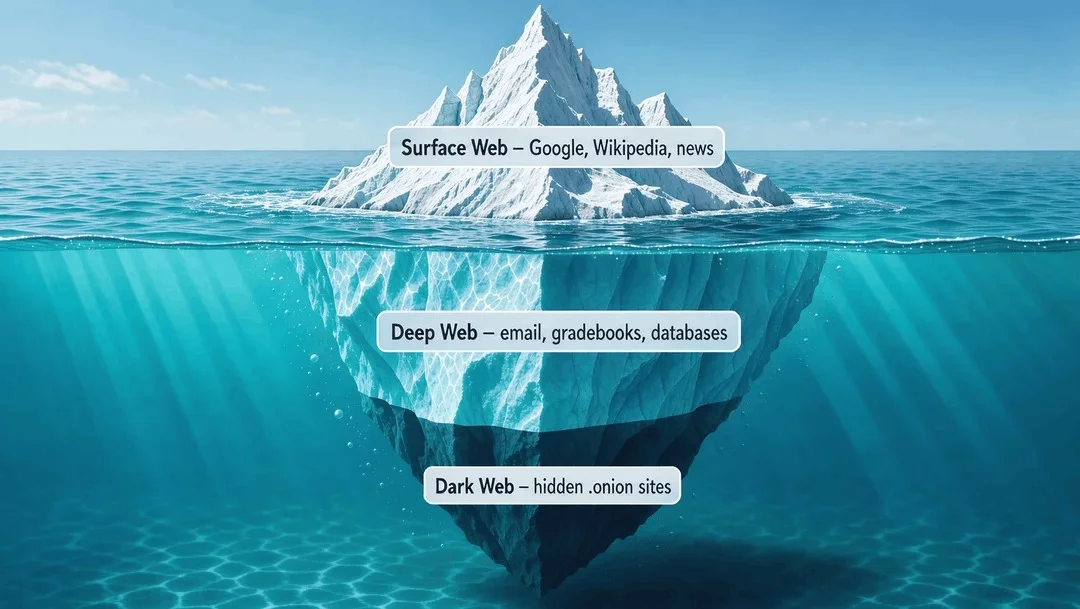
The usual way of explaining the three layers is to compare them to an iceberg. The section above the water is the part that search engines can see, while everything below the waterline is hidden from search, and the very bottom is the part that is deliberately hidden.
The surface web is the part that is visible, the deep web is the large amount beneath the water, and the dark web is a small section that has been intentionally hidden.
The Surface Web (Layer 1)
The surface web consists of all public pages that a search engine is able to find and include in its results. You are accessing the surface web if you type a question into Google or Bing and end up on a page without having to log in.
Search engines create their results using automated programs known as crawlers. These crawlers go from page to page by following links and store what they find in a huge index. All the content that they can access without any restrictions becomes searchable.
Everyday examples
- Wikipedia articles and online encyclopedias
- News sites and public blogs
- Educational sites such as Khan Academy or a museum homepage
- Public YouTube videos
- A school’s public homepage with its calendar and contact details
Students should be made aware that just because something is labelled “public” does not mean that it is true. Since the surface web is the place where most misinformation is circulated, it is the ideal area in which to develop the habit of verifying sources by considering who produced the information, when it was produced, and what evidence is provided.
The Deep Web (Layer 2)
The deep web consists of all the parts of the internet that search engines are unable to index, typically because they are protected by a password, a paywall, or a search form. Although it may seem mysterious, you make use of it every single day.
The deep web is much larger than the surface web, since every private inbox, every cloud folder, and every database that only responds when you enter a query is part of it.
Everyday examples
- Your Gmail or Outlook inbox
- Google Classroom, Canvas, or another learning platform
- Online gradebooks and student information systems
- Library databases such as JSTOR or EBSCO
- Private documents in Google Drive or OneDrive
- A teacher’s quiz dashboard on a game-based learning tool
- Online banking and medical portals
What students need to know is that the deep web is not dangerous. It is just private. The key point here is to protect your privacy by using strong and unique passwords, enabling two-step verification, and never giving your login details to friends.
The Dark Web (Layer 3)
The dark web makes up a small portion of the deep web and is deliberately concealed, so it can only be accessed using special software, most frequently the Tor Browser. The sites on it have addresses ending in “.onion” rather than “.com” or “.org” and do not show up in normal search results.
Tor (which is short for “The Onion Router”) sends your connection through a number of volunteer-run computers around the world. At each of these computers, a layer of the encryption is removed, just like the layers of an onion, which makes it very difficult to tell who is visiting which site.
Who actually uses it? The dark web has real, legitimate users, including
- Journalists protecting their sources
- People in countries with heavy internet censorship
- Whistleblowers reporting wrongdoing
- Privacy-focused organisations, with several major news outlets and social networks running official .onion versions of their sites
It is also used for scams, illegal markets, and stolen data. That combination is precisely what has given it such a terrifying reputation.
Since there is no Google for .onion addresses, people find sites through directories. The most well-known of these is the hidden wiki, which is a list of onion addresses that has been copied and re-posted numerous times. These lists of dark web links are frequently out of date, and some of the copies intentionally include fake addresses that lead to phishing pages or scams. It is useful to understand how these directories function, but this knowledge is not an invitation to go browsing.
Remember that while visiting the dark web is not automatically against the law in most countries, a great deal of the material available there is. Students should not attempt to explore it themselves or use school equipment for this purpose. Teachers, on the other hand, can use it as a useful subject when talking about privacy, free speech, and the risks associated with the internet, all without anyone having to log on.
Surface vs. Deep vs. Dark at a Glance
| Surface web | Deep web | Dark web | |
| What it is | Public pages search engines index | Private pages behind logins, paywalls or forms | Hidden sites that need special software |
| How you reach it | Any normal browser | Normal browser plus a login | Tor Browser and .onion addresses |
| Shows up in Google? | Yes | No | No |
| Examples | Wikipedia, news sites, public videos | Email, gradebooks, library databases | Anonymous news drops, hidden forums, illegal markets |
| Legal to use? | Yes | Yes | Usually, but much of its content is not |
| Risk for students | Misinformation, ads, scams | Weak passwords, data leaks | Scams, malware, illegal and disturbing content |
Common Myths, Busted
Myth 1. “The deep web and the dark web are the same.” This is not true. The deep web consists mainly of normal private content, for example your inbox. The dark web is a small, intentionally concealed part of the deep web.
Myth 2. “Using Tor makes you a criminal.” Tor is allowed in most countries and was at first funded by the U.S. government. Many people use it to protect their privacy, not to commit crimes.
Myth 3. “You can end up on the dark web by accident.” This is not the case. Since ordinary browsers cannot open .onion addresses, getting to the dark web always requires deliberate action.
Myth 4. “The dark web makes up most of the internet.” The large hidden section of the internet is the deep web. The dark web is only a very small part of it.
Myth 5. “Anonymity ensures safety.” Just because you hide your location doesn’t mean you’re protected against scams, fake websites, or harmful downloads. In fact, these risks are greater on the dark web, not smaller.
Safety Tips for Students
- Don’t trust anything unless you’ve checked it. When you’re looking at the surface web, check the author, the date, and the evidence before you share anything.
- Secure your deep web accounts by using a separate strong password for each one and enabling two-step verification.
- Don’t ever give out your logins, not to friends, not in group chats, not even temporarily.
- It’s best to avoid the dark web, since it doesn’t have anything you need for school and there is a real risk of falling victim to scams and encountering harmful content.
- Be careful about posts that promise a “secret link”. Posts and videos that offer hidden content are often designed to lure you into downloading malware or falling for scams.
- If you come across anything online that concerns or upsets you, tell an adult such as a teacher, a parent, or the school counsellor.
Ideas for the Classroom
- Iceberg sketch. Ask the students to draw an iceberg and place common services (such as Wikipedia, their school email, and a library database) into the right layer.
- Search-engine investigator. Have the students try to find their own gradebook on Google. When they can’t, discuss why. That is the deep web at work.
- Myth or fact quiz. Turn the myths listed above into a quick review game using your favourite quiz platform.
- Privacy debate. Should people have the right to be anonymous on the internet? Look at it from two sides, with journalists and whistleblowers on one side and online crime on the other.
- Password workshop. Practise creating passphrases and setting up two-step verification together.
These activities teach the concepts without anyone having to go to a dangerous site.
Final Thoughts
The internet can be divided into three layers. The surface web is public and searchable, the deep web is private and needs a login, and the dark web is deliberately hidden and can only be reached using special tools. Most of what students do every day takes place on the first two layers, and the dark web is best understood from a distance.
Once students understand the difference, the alarming headlines lose their impact, and the discussion can turn to the issues that matter, such as thinking critically about what they read, protecting their accounts, and making safe choices online.
Disclaimer: This article is for general informational and educational purposes only. Internet technologies, legal status, browser availability, and online risks vary by country and may change without notice. Visiting the dark web is not automatically illegal in most countries, but much of its content is, and students should not attempt to access it or use school equipment for that purpose. Statistics, definitions, and third-party references are general in nature and should be verified against current, authoritative sources. Teachers should follow their school’s acceptable-use and digital safety policies. Any mention of specific tools, platforms, or services does not imply endorsement. The author and publisher disclaim any liability for decisions made based on this content.
Every great journey begins with a single insight—our growth guides give you the clarity to take that first step.