I used to think website speed was mostly a code problem. Bloated images, too much JavaScript, unoptimized CSS, that kind of thing. And sure, all of that matters. But there was a moment a few years back that completely changed how I thought about it, when I moved a perfectly optimized website from one host to another and watched load times drop by more than half, without touching a single line of code.
Nothing about the site changed. Same images, same theme, same plugins, same everything. The only difference was the server it was sitting on. That was the moment it really clicked for me that hosting isn’t just some background detail you set up once and forget about. It’s genuinely one of the biggest factors in how fast your website actually feels to a real visitor.
The Part Nobody Talks About Enough
Most speed advice out there focuses on the stuff you can control on the surface, compressing images, minifying code, using a good theme. All useful, honestly. But there’s this whole other layer underneath that most people never think about, and that’s where hosting quietly does most of the heavy lifting.
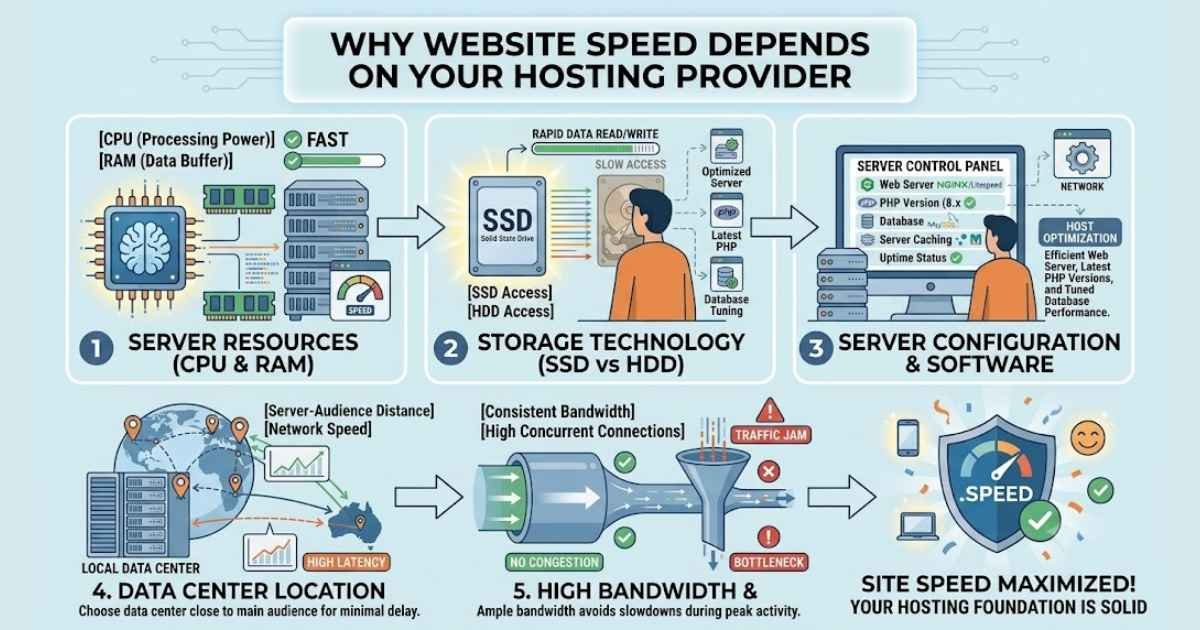
Every time someone visits your site, the request has to travel to a server, get processed, pull data from a database, and send everything back. How fast that whole chain happens depends heavily on the hardware behind it, how many other websites are sharing that same server, how the server is configured, and how close it physically is to the person visiting.
You can have the most beautifully optimized website in the world, and it’ll still feel sluggish if it’s sitting on a weak, overcrowded server. I learned this the hard way, spending hours optimizing a site that was already lean, wondering why it still felt slow, before realizing the bottleneck wasn’t my code at all.
Shared Hosting And The Noisy Neighbor Problem
Here’s something that took me a while to fully understand. On most budget shared hosting plans, you’re not getting a dedicated slice of server resources. You’re sharing that server with potentially hundreds of other websites, and if one of them suddenly gets a traffic spike or starts running something resource-heavy, everyone else on that server can feel it too.
This is often called the noisy neighbor problem, and it’s genuinely frustrating because it’s completely outside your control. Your site could be perfectly built, and it’ll still slow down because some other website on the same server decided to have a busy day. I’ve watched this happen firsthand, checking server load during a slowdown and realizing it had nothing to do with my own traffic at all.
This is exactly why moving to a fast VPS hosting made such a noticeable difference for me. Having dedicated resources, even a modest amount, meant my site’s speed depended on my own traffic and my own setup, not on what some unrelated website was doing at the same time.
Server Location Actually Matters More Than People Think
Something else that surprised me early on was just how much physical distance affects load times. Data has to travel, and even though it moves incredibly fast, that travel time adds up, especially for visitors far from wherever your server actually lives.
If most of your visitors are in one region and your server is sitting somewhere far away, that distance alone can add noticeable delay before your page even starts loading. I didn’t take this seriously until I actually tested it myself, checking load times from different parts of the world and seeing a real, measurable difference depending on where the server was located relative to the visitor.
This is part of why I pay attention to where a hosting provider’s data centers actually are, not just their advertised speed claims. A server that’s blazing fast for visitors in one region can feel noticeably slower for visitors somewhere else entirely, and if you’re building something for a global audience, that’s not a small detail to overlook.
Server Software And Configuration Quietly Shape Everything
This is the part that’s easy to overlook because it happens completely behind the scenes. Two servers with identical hardware can perform very differently depending on how they’re configured, what caching is enabled by default, how the database is tuned, and what software stack is actually running underneath your site.
I’ve seen hosting providers running outdated PHP versions, weak default caching, and database configurations that clearly hadn’t been touched in years. None of that shows up when you’re just looking at advertised specs or pricing plans, but it absolutely shows up in real-world load times once your site is actually live and getting traffic.
This is why I’ve become someone who actually asks questions before choosing hosting now, instead of just comparing prices. What caching is available. What PHP version is running. Whether the database setup is actually optimized or just left at default settings. These questions feel a bit technical for casual users, but the answers genuinely predict how your site is going to perform once real visitors start showing up.
Uptime And Speed Are More Connected Than People Realize
I used to think of uptime and speed as two completely separate things, but they’re actually deeply connected. A server under heavy strain doesn’t always go fully down, sometimes it just gets painfully slow instead, technically still “up” but barely usable. Visitors experience that exactly like downtime, even though it wouldn’t show up as an outage on a status page.
This connection became really clear to me after digging through hosting discussions in communities like Ekuraa, where people share honest, first-hand accounts of how different providers actually perform under real traffic, not just what the marketing page promises. Reading through those experiences taught me a lot more about real-world reliability than any official specs sheet ever did, because people there talk openly about slowdowns during traffic spikes, not just total outages.
Where A CDN Fits Into All Of This
I’d be leaving out an important piece if I didn’t mention content delivery networks, because they work hand in hand with hosting to solve the distance problem I mentioned earlier. A CDN basically stores copies of your site’s static content, images, stylesheets, scripts, across multiple locations around the world, so visitors load those files from a server near them instead of traveling all the way back to your main hosting location every single time.
I added a CDN fairly early on, and it genuinely helped, especially for visitors far from my main server. But here’s something I learned the hard way, a CDN isn’t a replacement for solid hosting, it’s an addition to it. It speeds up static content delivery, but your actual server still handles the dynamic parts, database queries, logged in user sessions, anything that has to be generated fresh each time. If that underlying server is weak or overloaded, a CDN can only mask so much of the problem before it shows through anyway.
I think this is where a lot of people get a false sense of security, assuming a CDN fully handles speed once it’s set up. In reality, it’s one piece of a bigger picture, not a fix for weak infrastructure underneath it.
A Mistake I Made That Taught Me This The Hard Way
Early on, I moved a client’s website to what looked like a great deal, cheap hosting with seemingly generous specs listed on the page. A CDN really matters for high performance hosting. The site looked fine during testing, loaded reasonably fast when I checked it myself. A few weeks later, the client mentioned visitors were complaining about slow load times, particularly during certain hours of the day.
I dug into it and realized the “generous specs” were shared among a huge number of accounts on that server, and during peak hours, when everyone’s traffic overlapped, performance dropped noticeably. My own testing had happened during a quiet period, so I never actually saw the real problem until real users started experiencing it consistently.
That mistake taught me to always test hosting during different times, not just once when things happen to be quiet, and to be genuinely skeptical of specs that sound too generous for the price. If a deal looks unusually good, it’s worth asking exactly how those resources are actually being shared behind the scenes, because that detail is often where the real story lives.
What Actually Changed For Me
After going through all of this myself, here’s what I actually pay attention to now when choosing hosting for anything I care about performing well.
I look for guaranteed resources rather than vague shared capacity, even if that means paying a bit more. Knowing exactly what CPU and memory I actually have access to matters more to me now than a cheaper price tag with unclear limits.
I check where the data centers actually are relative to where my visitors are coming from, instead of assuming any server anywhere will perform the same for everyone.
I ask directly about caching, PHP versions, and database optimization instead of just trusting a generic “optimized for speed” claim on a pricing page, because that phrase gets used a lot without much behind it.
I look at real uptime history and genuine user experiences, not just a promised percentage, because I’ve learned that the number alone tells you very little about what actually happens during a busy traffic day.
And I test things myself whenever possible, checking load times from different locations, running my site during a normal busy period, rather than just trusting whatever the hosting provider’s dashboard shows me.
A Quick Example From My Own Experience
I want to share one more thing that really stuck with me. I once ran the exact same lightweight test page on two different hosting plans, one budget shared plan and one modest VPS, just to see the difference for myself. The shared plan loaded noticeably slower, and during a simulated traffic spike, it slowed down even further, sometimes taking several extra seconds just to respond.
The VPS handled the same spike without much change at all. Same page, same content, same everything except the infrastructure underneath it. That side-by-side comparison made the whole “hosting affects speed” idea feel real to me in a way that reading about it never quite did. It’s one thing to hear that hosting matters, it’s another thing entirely to watch it happen with your own eyes on the exact same website.
My Honest Takeaway
If there’s one thing I’d want someone to take away from all of this, it’s that website speed isn’t purely a code problem, no matter how much advice out there focuses only on that side of things. Your hosting is the foundation everything else sits on, and no amount of clever optimization can fully make up for weak, overcrowded, poorly configured infrastructure underneath it.
Take hosting seriously as part of your speed strategy, not just a checkbox you fill out once and forget about. Ask real questions, test things yourself when you can, and pay attention to what real users say about how a provider performs under actual traffic. That’s genuinely where the real difference gets made.
Disclaimer: The information provided in this article is for general informational and educational purposes only. It does not constitute professional hosting, development, or purchasing advice. Server performance, hosting plans, and real‑world results vary; always test providers under your own conditions before committing. The author and publisher disclaim all liability for any site downtime, speed issues, or financial losses arising from reliance on this content. Mention of specific communities or platforms does not imply endorsement. This article does not guarantee particular speed outcomes.
Unlock the power of knowledge—explore curated tenderness that holds you through hard days.