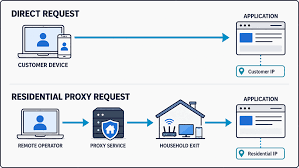
Ask ten people who buy residential proxies how the network actually works and most of them will shrug. They know it’s “real home IPs” and that it costs more per gigabyte than datacenter stuff. That’s about it.
Which is fine, until success rates drop and nobody can say why. The answer usually sits a few layers down, in how the IPs got into the pool and what a website sees when a request shows up.
Where Residential IPs Actually Come From
Start with the basics. A residential IP is just an address an ISP gave to a home subscriber, so it’s registered to someone like Comcast in the US or Deutsche Telekom in Germany, not to a hosting company. Run a WHOIS lookup on one and the carrier’s name comes back, which is the first thing anti-bot tools look at.
Proxy companies can’t go out and buy these in bulk (ISPs don’t sell them that way). So they get access through people who agree to share their connection, usually via an SDK inside a free app or a program that pays for unused bandwidth.
Payouts vary. Some offer cash, others give app credits or remove ads.
How a provider sources its pool matters more than most buyers think, both for legal risk and for how stable the pool stays over time. For a solid primer, the IPRoyal article on what is a residential proxy service covers how ethically sourced networks differ from ones built on users who never really agreed to anything.
How Traffic Moves Through the Network
There are usually three pieces. The client talks to a gateway (people call it a backconnect or super proxy), the gateway hands the request to a residential exit node, and that node loads the page.
The site only sees the exit node’s IP. Well, mostly: a badly configured gateway can still leak the real address through forwarding headers, and MDN’s reference on the X-Forwarded-For header is a good read for anyone building scrapers who wants to know what to strip out.
Most gateways speak both HTTP and SOCKS5. SOCKS5 goes back to RFC 1928 from 1996, and since it handles any TCP traffic (plus UDP), it’s the one to pick for anything that isn’t plain web browsing.
Rotation is handled at the gateway too. You either get a new IP on every request or keep a “sticky” one for something like 10 or 30 minutes, which you’ll want for logins and checkouts, because swapping IPs halfway through a cart is a quick way to get flagged.
Why Websites Trust Residential Traffic
Most anti-bot systems check which network an IP belongs to before they look at much else. If the autonomous system belongs to AWS or DigitalOcean, the visitor is probably a server. If it belongs to a consumer ISP, it looks like a regular person shopping after work.
In practice, datacenter IPs run into a lot of CAPTCHAs and 403 errors on retail and travel sites. Residential IPs from the same country usually get through first time, and Akamai and Cloudflare both factor IP reputation into their bot scores.
And supply is limited. IPv4 only has about 4.3 billion addresses, nearly all of them handed out long ago through the five regional internet registries, so an ISP can’t just create new home ranges the way AWS spins up servers.
The Tradeoffs Nobody Advertises
The downside of real home devices? They behave like real home devices. Someone shuts a laptop or the router restarts, your session’s gone (sticky or not), and latency jumps around a lot more than on servers.
That’s also why it’s billed per gigabyte, and it isn’t cheap. Several times the datacenter rate is normal, so don’t push large downloads or video through it.
Most teams that run this well mix the two. Datacenter IPs handle the bulk, low-risk requests, and residential IPs only go to sites that actually block servers.
One more thing to check is consent. If a provider can’t tell you how its exit nodes signed up, assume they didn’t, and expect that pool to shrink the day an app store pulls the SDK.
What Comes Next
IP checks aren’t the whole picture anymore. Anti-bot vendors already score TLS fingerprints, browser behavior and request timing, so a clean residential IP won’t save a sloppy scraper for long.
So it pays to know how the pipes work, not just how big the pool is. Teams that ask providers hard questions about sourcing and routing tend to get better results than the ones comparing IP counts on a pricing page.